We hear this all the time. "Our emails are performing great - open rates are solid, click rates are above benchmarks." Then we look at the revenue and it doesn't match.
Good click rates and disappointing revenue aren't the same problem. They're related, but they come from different places. And mixing them up usually means you're fixing the wrong thing.
Clicks and Revenue Are Two Different Conversations
If your email is compelling, people will click. That's not the hard part. The hard part is what happens after the click.
There are really two sides to this.
The first is whether your email is setting expectations properly. You can get great click rates with a punchy subject line and an eye-catching hero image, but if the experience someone lands on doesn't match what they just read in that email, you've set them up for disappointment. Maybe the product isn't as discounted as the email implied. Maybe the "new collection" they clicked on is three items. Maybe the CTA said "Shop the Sale" and the link went to a homepage that doesn't mention a sale at all.
That's not a click rate problem. That's a follow-through problem. And it shows up in revenue, not in your engagement metrics.
The second side is simpler but harder to fix from the email side: your site might just need some work. Maybe your emails aren't sending people to the right page. Maybe the product pages don't convert well. Maybe the checkout has friction you haven't noticed because you've never actually watched someone go through it.
What Email Can Control (and What It Can't)
On the email side, we make sure of two things: that the expectations in the message are genuine, and that the destination makes sense for the CTA that was clicked.
That sounds obvious, but it breaks down constantly. A "Best Sellers" CTA that links to a collection page sorted by newest arrivals. A product launch email that links to the homepage instead of the actual product. A discount email where the code isn't auto-applied on the landing page.
Every one of those is a revenue leak disguised as "the emails are performing fine."
What email can't always control is what happens on the site itself. Most email agencies can't even tell you when the site is the problem - they don't have the dev resources or the CRO experience to diagnose it. We do. It's not part of every engagement, but when the data points to site-side friction, we can actually help fix it. The point is: you need someone who can at least see both sides of the equation.
The Metric Nobody Looks At
Most brands track open rate and click rate. Some track revenue. Almost nobody tracks the metrics in between.
Here's the full chain:
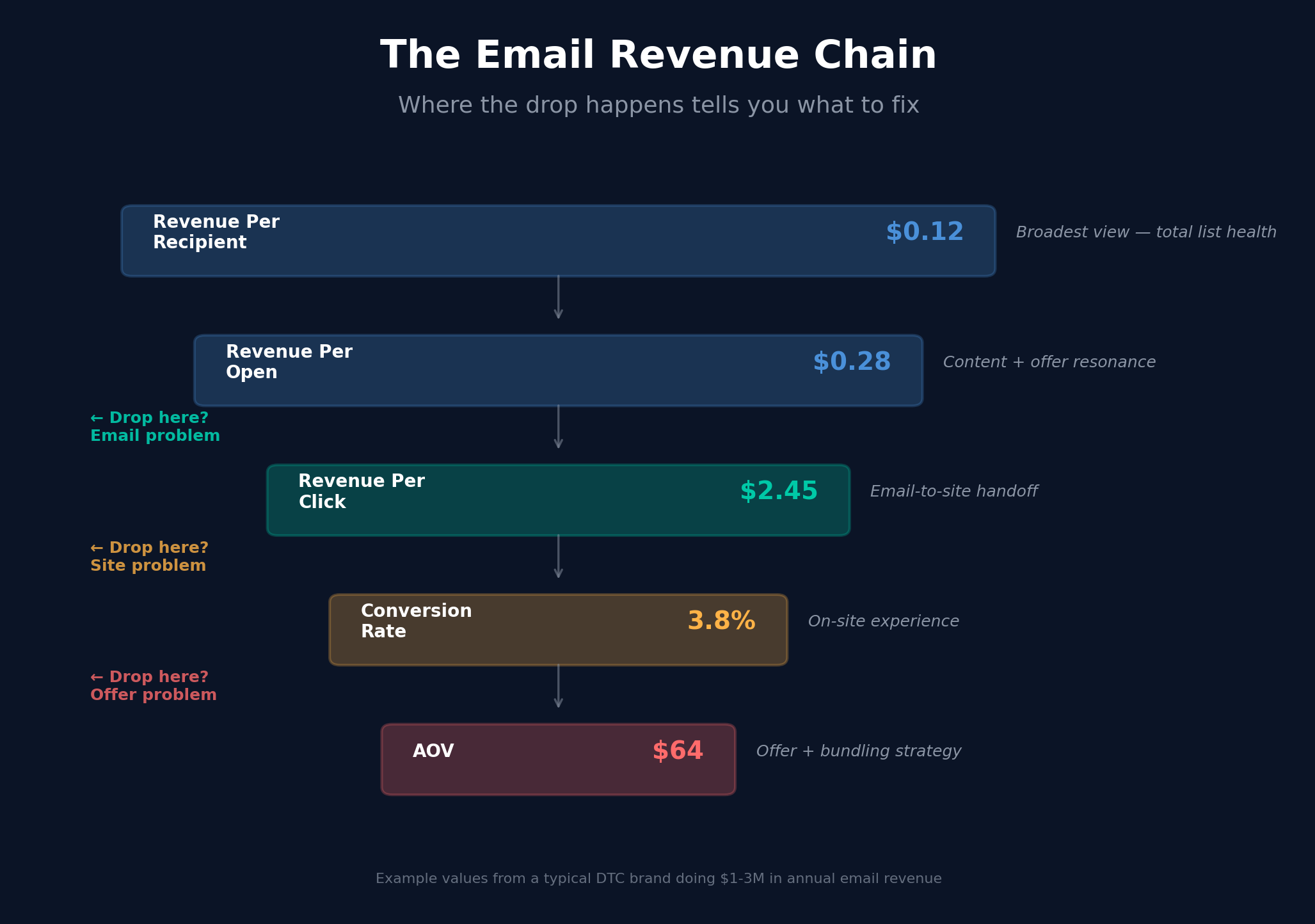
Revenue Per Recipient tells you how much each person on your list is worth per send. It's the broadest view - if this number is flat or declining, something in the pipeline is broken.
Revenue Per Open narrows it down. If people are opening but not generating revenue, the content or the offer might not be landing.
Revenue Per Click is where it gets interesting. If people are clicking but not buying, the disconnect is between your email and your site. The email did its job. Something after the click didn't.
Then there's AOV and average items per order. These tell you whether the people who do buy are spending enough. You might have a perfectly fine conversion rate from clicks to purchases, but if everyone is buying one discounted item, your revenue per click is still going to look underwhelming.
When we look at a client's email performance, we don't just look at one of these. We look at all of them. Because the number that's underperforming tells you exactly where to focus.
Where the Money Actually Leaks
There are a few common patterns we see:
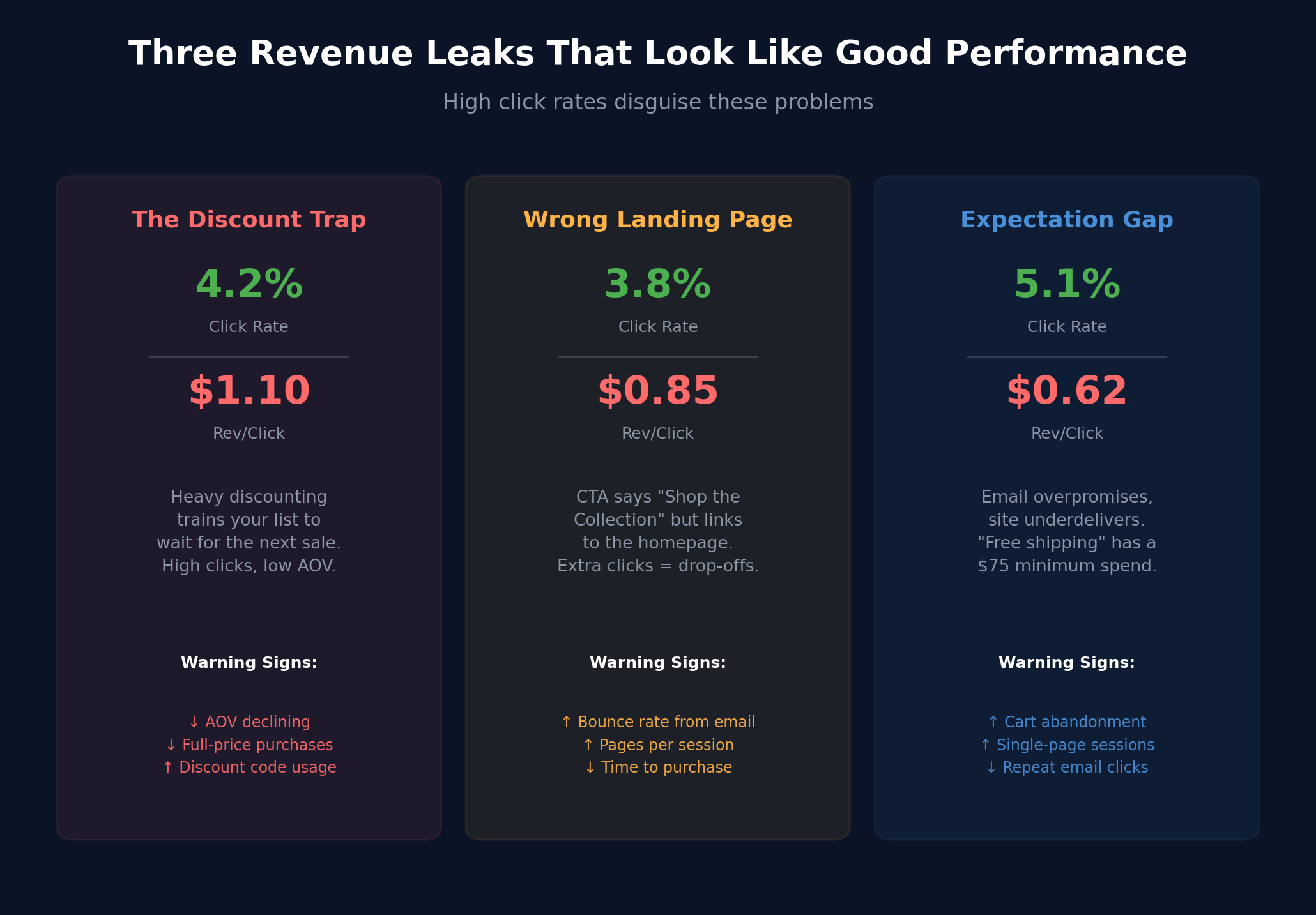
The discount trap. Brands that lean too hard on discounts in email get plenty of clicks. People love a deal. But heavy discounting trains your list to wait for the next sale, tanks your AOV, and attracts a buyer who was never going to pay full price anyway. Your click rate looks great. Your revenue per click looks terrible.
The wrong landing page. This one is surprisingly common. An email about a specific product or collection links to the homepage. Or worse, links to a collection page where the featured product is buried below the fold. Every extra click someone has to make between the email CTA and the product they wanted is a point where they drop off.
The expectation gap. The email promises something the site doesn't deliver. Free shipping that has a minimum spend. A sale that excludes half the catalog. A "limited edition" drop that's actually a preorder with a 6-week ship time. The click happened because the email was compelling. The purchase didn't happen because the reality wasn't.
It's Not Always the Site. Sometimes It's What the Email Told Them to Do.
Here's the thing people miss: the email itself can be the reason someone places a small order. Not because the email was bad - because the email was too narrow.
Think about a typical product launch email. It features one product, one hero image, one CTA. The subscriber clicks, lands on the product page, adds it to cart, checks out. One item. Done. The email did exactly what it was designed to do. And that's the problem.
If every email you send is built around a single product with a single action, you're training your list to think transactionally. Click, buy this one thing, leave. There's no reason for them to explore, no prompt to build a bigger cart, no suggestion that there's more worth looking at.
Compare that to an email that includes a "pairs well with" section below the hero. Or one that leads with a use case instead of a product - "here's how to set up your morning routine" with three products that work together. Or a post-purchase flow that says "here's how to get more out of what you just bought" and introduces a complementary item.
That's not upselling. That's context. You're helping someone understand why they might want more, instead of just pointing them at one thing and hoping for the best.
The difference in AOV between a "buy this" email and a "here's how this fits into your life" email is significant. And it has nothing to do with the site experience. It's pure email strategy - how you frame the purchase before they ever leave their inbox.
How to Actually Diagnose This
If your click rates are healthy but your revenue isn't keeping up, don't start by tweaking your emails. Start by watching what happens after the click.
Look at your analytics. Filter by email traffic specifically. What pages are those visitors landing on? What's their bounce rate compared to other traffic sources? How many pages do they visit? Where do they drop off in the checkout?
Better yet, use a session recording tool. Watch 20 or 30 sessions of people who came from email. You'll see the friction points immediately - the page that takes too long to load, the size selector that's confusing, the popup that fires the second they land and covers the thing they came to see.
The data from those sessions will tell you more about why your email revenue is underperforming than any A/B test on a subject line ever could.
And don't stop at engagement metrics. Compare the financial behavior of email visitors against everyone else. What's the AOV for people who came from email versus organic or paid? How many items per order? What's their revenue per session? If email buyers are consistently placing smaller orders than the average customer, your email setup might be pigeonholing them - pushing them toward a single discounted item instead of letting them discover the full catalog. Understanding those revenue patterns by traffic source is what separates a "good click rate" from a genuinely profitable email channel.
The Takeaway
A healthy click rate means your email program is doing something right. People are engaged. They're interested. They're raising their hand.
If the revenue isn't following, the answer isn't to change the emails that are already working. It's to figure out what's happening between the click and the checkout, and fix the handoff.
Look at the full metrics chain. Find where the drop happens. And be honest about whether the problem is on the email side or the site side - because the fix is completely different depending on which one it is.


