For about a decade, the first thing anyone did when email got weird was open Postmaster Tools and look at Domain Reputation. High, Medium, Low, Bad. It was the closest thing we had to a scoreboard, and pretty much every deliverability conversation I've ever had with a client started there.
That scoreboard is going away, and most brands haven't noticed yet.
Google's new Postmaster Tools (v2) carries over everything from the old interface except the Domain and IP Reputation dashboards, which are being retired. In their place: a Compliance status dashboard, and a diagnostic called Deliverability analysis that just tells you in a sentence what's wrong and what to do about it. Google is also postponing the shutdown of the old web interface after sender feedback, so you'll probably still see the old one for a while. The direction is settled either way.
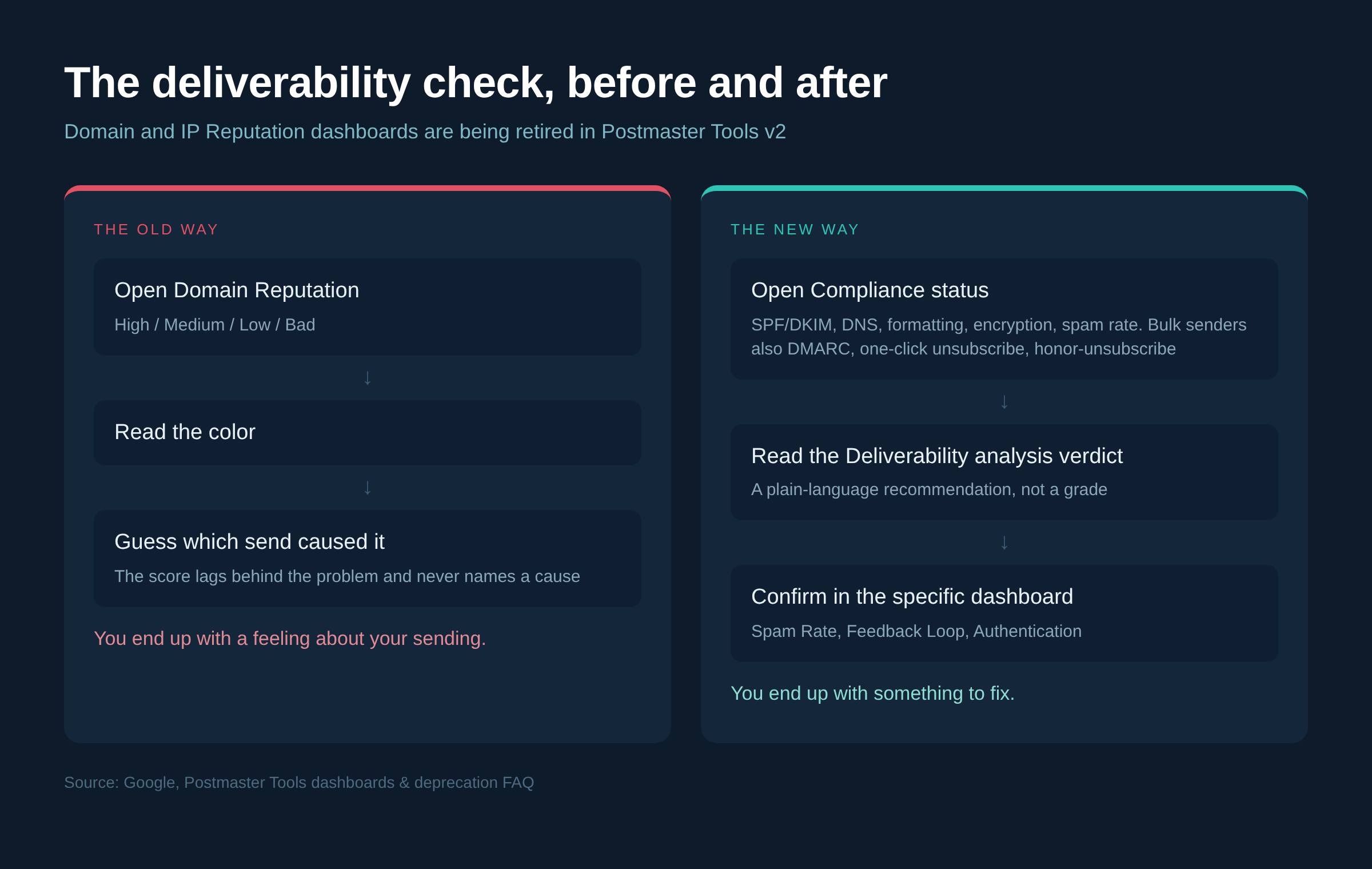
Here's what actually changed and what to do with it.
Why they killed the reputation score
Google's own explanation is worth reading, because it's more honest than most product deprecation notes. Their reasons: reputation data isn't easily actionable for most senders, changes in sender behavior are slow to show up in the dashboard, and the dashboard can be misleading because reputation is only one of many factors affecting deliverability.
That matches what we see. I've had accounts sitting at "High" domain reputation while a specific flow was quietly getting filtered, and accounts flashing "Low" for a week after one bad list import that had already been cleaned up. The number moved slower than the problem did, and it never told you which of your sends caused it.
So the honest version of the old workflow was: check the color, feel a feeling, guess at a fix. Google is replacing the feeling with instructions.
Compliance status: the part people skip
The Compliance status dashboard is available to all senders, not just bulk senders, and it checks your outgoing mail against Gmail's sender requirements. For everyone: SPF and DKIM authentication, DNS records, message formatting, encryption, and user-reported spam rate. For bulk senders (roughly 5,000+ messages to Gmail accounts in 24 hours, which is most brands running a real list): DMARC, one-click unsubscribe, and honor-unsubscribe.
Each requirement shows one of three states. Compliant, Needs work, or No data found. "Needs work" tells you what to change in the status column, which is the actionable part.
Four things about this dashboard that trip people up, straight from Google's docs:
It's primary domains only. If you added a sending subdomain like email.yourbrand.com, the dashboard reports on yourbrand.com as a whole. Subdomain data feeds the score but you can't see it broken out here.
It runs on a rolling multi-day average. Fix something today and it can take up to 7 days to show. If you're rechecking the morning after a DNS change and panicking, stop.
It can disagree with the other dashboards, on purpose. Compliance status uses slightly different datasets than Spam Rate or Authentication, so small mismatches aren't a bug.
Low volume days may be excluded to protect user privacy, so a small sender or a quiet week gives you thinner data than you'd expect.
Two failure modes worth calling out because we hit both regularly. One-click unsubscribe can show "Needs work" even when your campaigns have it, if recipients are marking your other messages as spam - the ones sent without it. That's usually transactional or notification mail sent from a different system than Klaviyo, and the Feedback Loop dashboard is how you find which messages. And "Honor unsubscribe" flips to "Needs work" if you don't remove people within 48 hours. Klaviyo handles that on its own list, but if you're syncing unsubscribes to or from another system on a nightly or weekly job, you can blow the window without anyone noticing.
Deliverability analysis: the new verdict
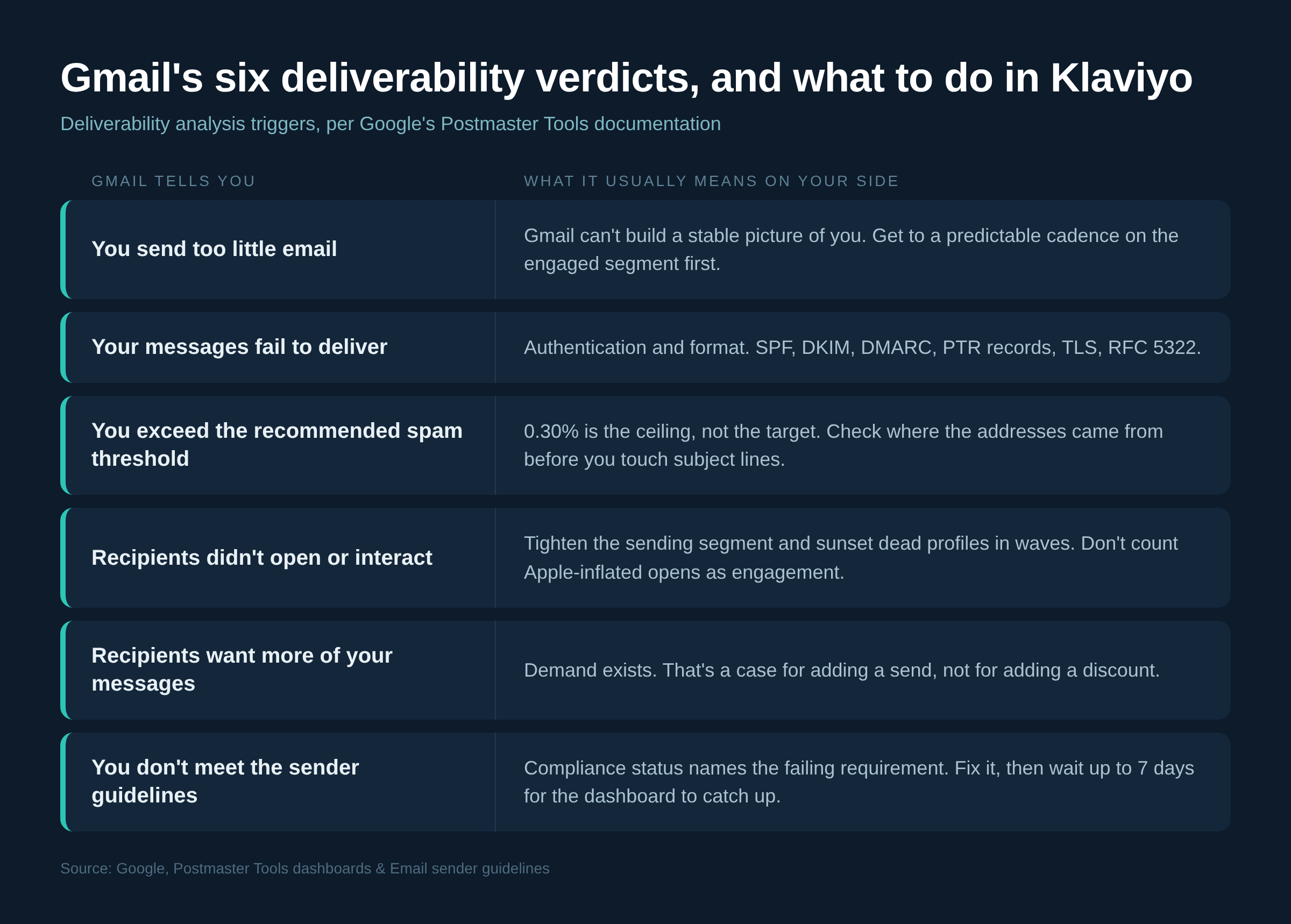
This is the part that got the attention. Under Compliance status, the Deliverability analysis tool gives a recommendation about your domain's status with Gmail. Per Google, you get recommendations when:
- You send too little email
- Your messages fail to deliver
- You exceed the recommended spam threshold
- Recipients indicate that they didn't open or interact with your email
- Recipients indicate that they want more of your messages
- You don't meet the email sender guidelines
Read that list again, because it's a map of Gmail's actual filtering logic in plain English. Two of those aren't errors at all. "You send too little email" and "recipients want more of your messages" are both Gmail telling you your sending is out of step with demand in one direction or the other.
What each verdict means on the Klaviyo side
"You send too little email." Usually a brand that sends one campaign a month and expects flows to carry the program. Gmail can't build a stable picture of you at that volume, and neither can your own reporting. The fix isn't to blast, it's to get to a predictable cadence on your engaged segment first and let volume come from consistency.
"You exceed the recommended spam threshold." The requirement is to keep spam rates in Postmaster Tools below 0.30%. That's the ceiling, not the target - a healthy ecommerce list should be sitting far under it, and anything trending toward it is a list acquisition or segmentation problem, not a content problem. Look at where the addresses came from before you touch subject lines.
"Recipients didn't open or interact." This is the one that overlaps with everything we already tell clients about engagement. Tighten the sending segment, sunset the dead profiles in waves rather than all at once, and stop counting Apple-inflated opens as proof anyone's reading. If you're judging engagement on open rate alone right now, you're likely sending to a bigger group than Gmail thinks wants you.
"Recipients want more of your messages." Rare, and worth acting on. If Gmail is telling you demand is there, that's a case for adding a send, not for adding a discount.
Failed delivery or guideline misses. Go straight to authentication and format. SPF, DKIM, DMARC, PTR records, TLS, RFC 5322 formatting. These are binary and fixable in an afternoon with your ESP and your DNS provider.
If anything of yours talks to the API
The v1 API is being retired now that v2 has launched, and v2 uses a different data schema, so anything automated has to be rewritten rather than repointed. The practical changes: trafficStats becomes domainStats, the get and list methods collapse into a single domainStats.query that takes a start and end date, there's a new getComplianceStatus method for SPF, DKIM and DMARC, and a batchQuery for pulling multiple domains in one call. Reputation isn't in v2 at all.
If your agency or dev team built a deliverability dashboard on v1 at some point and nobody's touched it since, that's a thing to check this month, not next quarter.
What we're changing
We used to open the reputation dashboard first. Now the order is Compliance status, then Deliverability analysis, then the specific dashboards - Spam Rate, Feedback Loop, Authentication - to confirm what the verdict is pointing at. Same data underneath, less interpretation.
The thing I'd push back on is treating any of this as a monthly report line. The dashboards lag by about 24 hours and compliance moves on a 7-day rolling average, which means it's a diagnostic you open when something changes on your side: a new sending domain, a big list add, a jump in cadence, a migration. Checking it on a schedule when nothing has changed just gives you numbers to stare at, which is exactly the habit Google is trying to break.
And the reputation grade going away is fine. It was a score, not an instruction. Nobody ever fixed a deliverability problem by learning they had one.


